Outreach from your own Gmail
Recruiter messages feel more natural when they come from you, not from an unfamiliar sender address. Jobifer prepares recruiter outreach via Gmail that's connected to your target role and profile.
Gmail recruiter outreach
Jobifer is a Gmail recruiter outreach tool for job-search workflows that stay reviewed, controlled, and tied to the opportunities you care about.
Why it matters
Recruiter messages feel more natural when they come from you, not from an unfamiliar sender address. Jobifer prepares recruiter outreach via Gmail that's connected to your target role and profile.
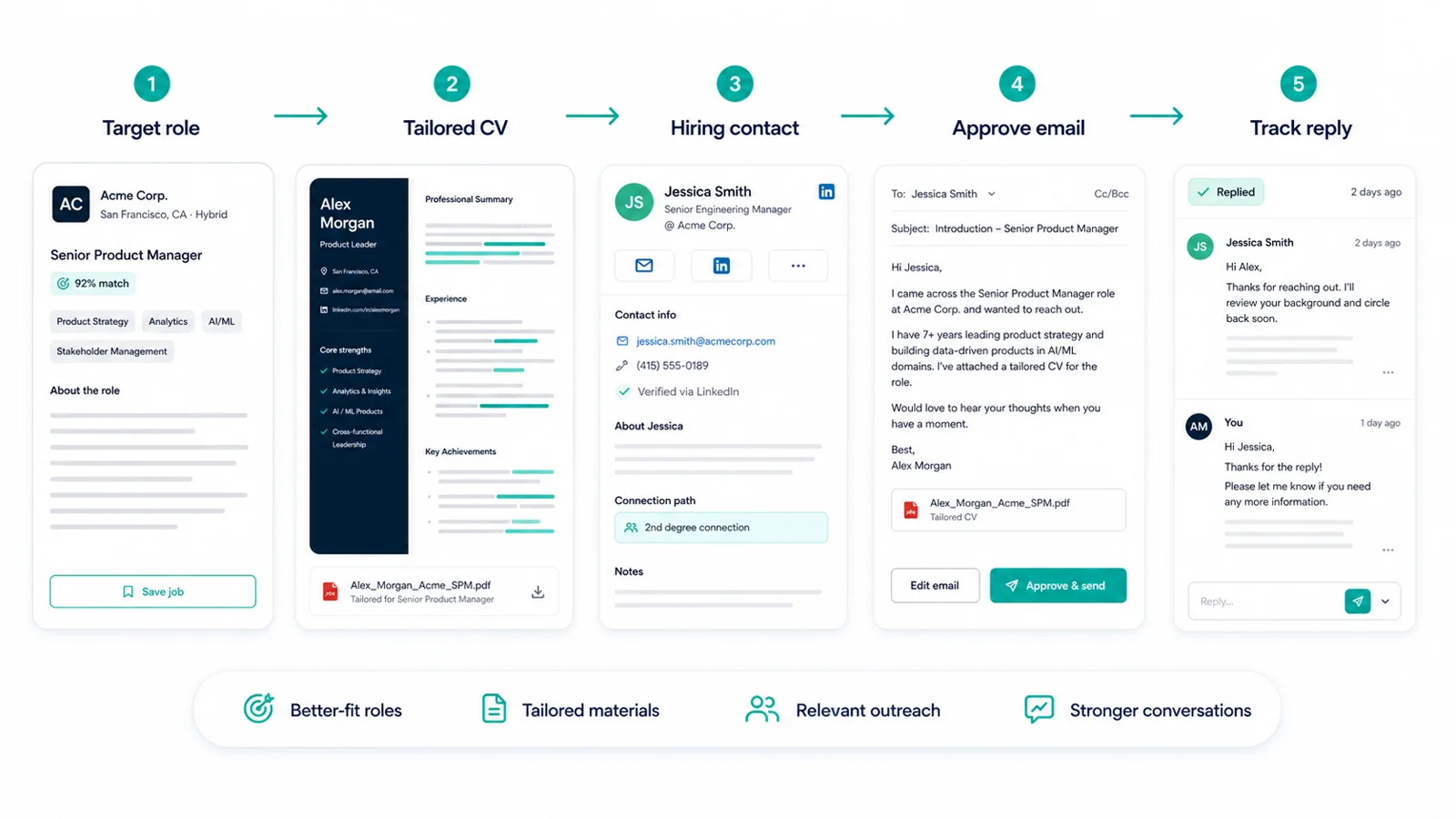
Jobifer drafts the message, but you review and approve everything before it goes out. That's what makes Gmail outreach for job seekers worth using - you keep the final say instead of handing over your voice.
When you begin job search outreach from Gmail through Jobifer, the sent introduction stays attached to the role and contact context that prompted it.
Related workflow context: read more about Job search automation, compare it with Recruiter outreach tool, or connect it to AI agent for job search.
Examples
These are the kinds of repeatable job-search moments where Jobifer is meant to add structure, context, and speed without making the search generic.
Handle your Gmail job search outreach by sending a reviewed introduction from your own Gmail account after approving the draft.
Keep the role, contact, tailored CV, and sent message connected.
Use Gmail directly when recruiters reply.
Avoid losing outreach context by tying sent introductions back to saved opportunities.
How it works
Jobifer authenticates through Google OAuth and never stores your Google password.
Jobifer builds the draft from the role, your profile, the contact, and the tailored CV.
You control the message before you send it from Gmail.
Replies land in Gmail, where you continue the conversation manually.
Use cases
Jobifer is built for targeted searches where better fit, cleaner materials, and direct outreach matter more than raw application volume.
Comparison
Jobifer centers on candidate-approved introductions and sent-history context, not bulk messages from an anonymous sequence tool.
Related workflow context: read more about Job search automation, compare it with Recruiter outreach tool, or connect it to AI agent for job search.
Differentiation
Uses official Google OAuth.
Keeps message approval with the candidate.
Connects sent Gmail introductions to job-search context.
Keeps Gmail recruiter outreach centered on approval, not bulk sequences.
Questions
No. Jobifer uses Google OAuth. Your Google password is never stored by Jobifer.
Yes. You can revoke access from your Google account permissions or inside Jobifer where supported.
Messages from your own Gmail can feel more natural and easier to continue as a real conversation, while still benefiting from Jobifer preparation and sent-history organization.
No. The send-only workflow is designed so replies and existing messages stay in Gmail.
Yes. The workflow is approval-first, so you can review and edit messages before sending.
Explore more
Learn what Jobifer automates while keeping you in control.
Recruiter outreach toolExplore reviewed outreach to recruiters and hiring managers.
AI agent for job searchSee Jobifer as the broader supervised AI job-search agent.
Job search CRMOrganize jobs, CVs, contacts, and approved outreach in one place.
Ready
Find stronger-fit roles, tailor your CV, prepare relevant outreach, and keep control of every send.
Start free