Reach people with context
Recruiter outreach works best when it is specific. Jobifer helps prepare messages that connect your background, the role, and the reason you are reaching out.
Recruiter outreach tool
Jobifer helps you prepare thoughtful outreach to relevant recruiters and hiring managers, so your search is not limited to crowded application portals.
Why it matters
Recruiter outreach works best when it is specific. Jobifer helps prepare messages that connect your background, the role, and the reason you are reaching out.
Jobifer is not designed to blast generic emails. It helps draft targeted outreach that you can review, edit, and approve.
Outreach lands better when it points to a role-specific CV and a clear fit story. Jobifer brings those pieces together before you send.
Related workflow context: read more about Gmail recruiter outreach, compare it with Hidden job market strategy, or connect it to AI resume tailoring.
Examples
These are the kinds of repeatable job-search moments where Jobifer is meant to add structure, context, and speed without making the search generic.
Draft a short introduction to a hiring manager after finding a strong-fit role.
Prepare a recruiter message that references the role, your relevant background, and the attached tailored CV.
Keep a record of the introduction sent from Jobifer.
Keep outreach drafts organized by company instead of losing them across scattered notes.
How it works
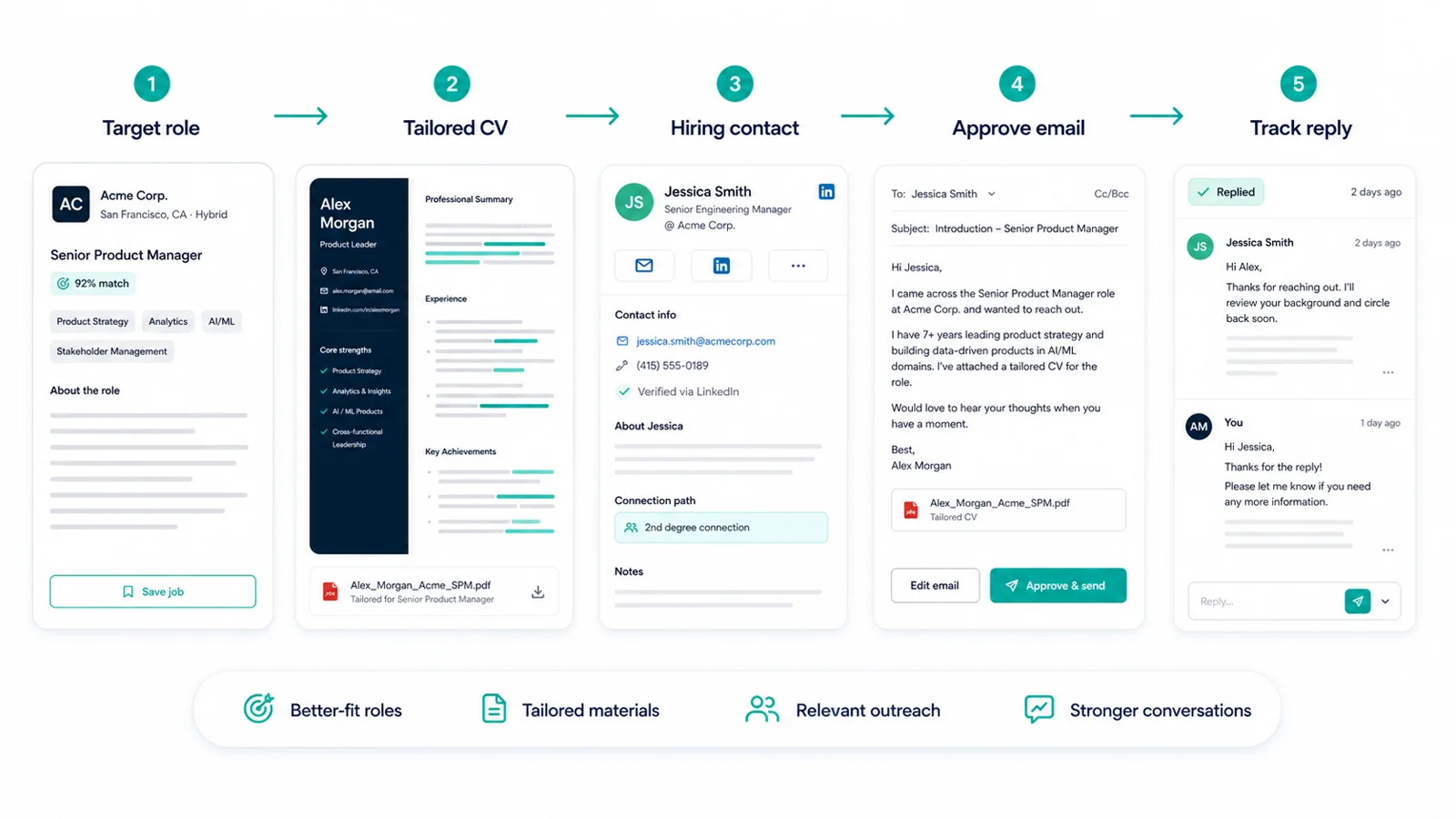
Outreach begins with a specific role or company context, not a generic message blast.
Jobifer supports finding relevant hiring contacts connected to the opportunity.
The message can reference the target role, your fit, and the supporting CV.
You review the message and stay responsible for what Gmail sends.
Use cases
Jobifer is built for targeted searches where better fit, cleaner materials, and direct outreach matter more than raw application volume.
Comparison
Jobifer is designed for reviewed, role-connected introductions. The aim is relevant conversations, not sending as many emails as possible.
Related workflow context: read more about Gmail recruiter outreach, compare it with Hidden job market strategy, or connect it to AI resume tailoring.
Differentiation
Keeps outreach connected to a tailored CV.
Supports recruiter and hiring-manager context.
Prioritizes reviewed messages over automation volume.
Helps keep sent outreach and next steps organized.
Questions
No. Jobifer prepares outreach for your review and approval.
Yes. Jobifer includes hiring contact research as part of its Introduction workflow.
Specificity. A clear role, relevant background, concise ask, and tailored CV usually create better signal than a generic cold message.
Jobifer focuses on the broader outreach workflow and can help prepare role-specific copy you review. Exact sending channels depend on the workflow you use.
It depends on the company and role. Jobifer helps keep the role, contact, materials, and message connected so you can choose the best route.
Explore more
Use your own Gmail for approved introductions.
Hidden job market strategyUse direct outreach to go beyond crowded application portals.
AI resume tailoringUnderstand how role-specific CV tailoring fits into the workflow.
Job search CRMOrganize jobs, CVs, contacts, and approved outreach in one place.
Ready
Find stronger-fit roles, tailor your CV, prepare relevant outreach, and keep control of every send.
Start free