A CRM built for candidates, not sales teams
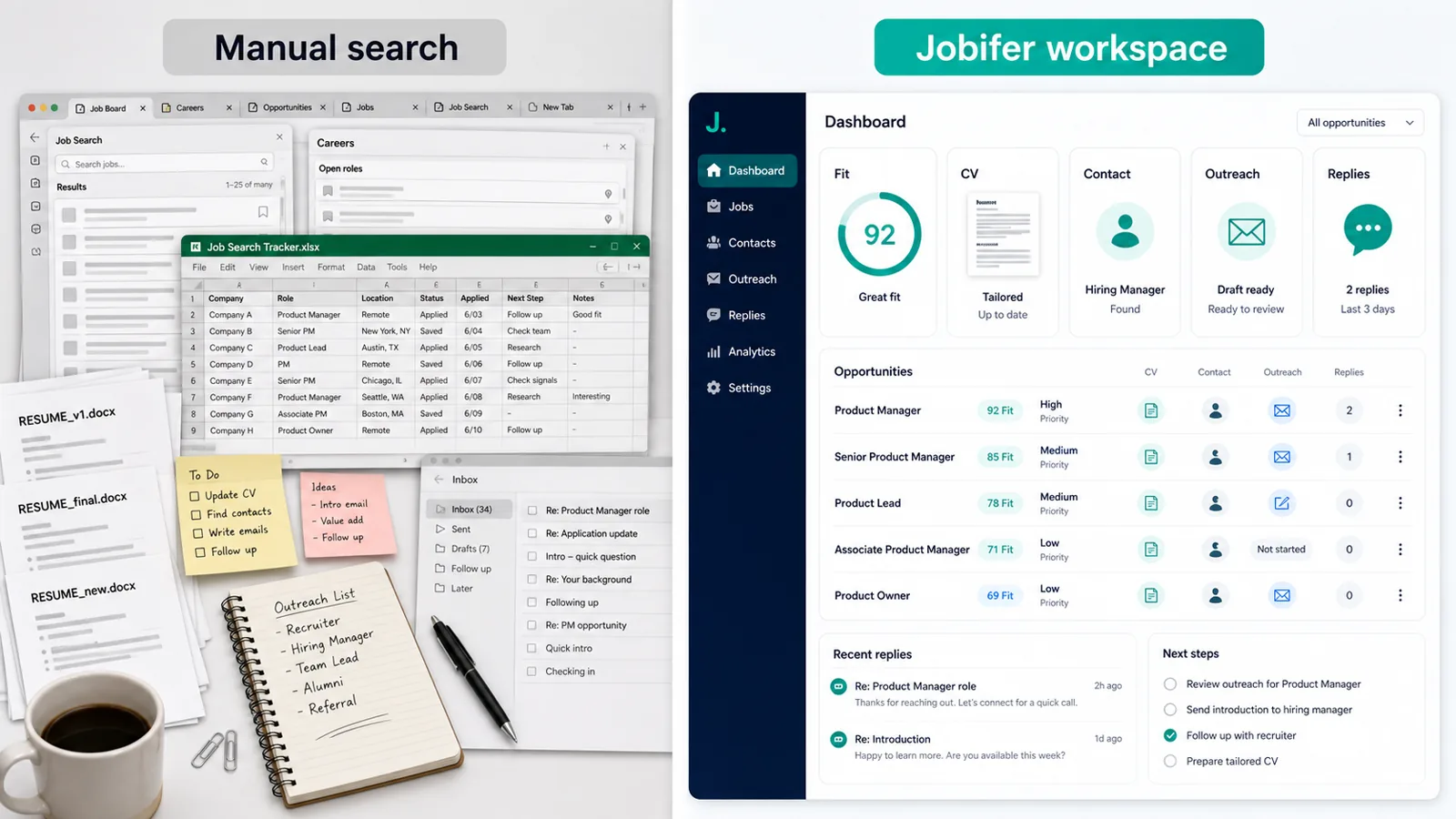
Traditional CRMs are built for sales pipelines. Jobifer is a CRM for job seekers instead, focused on the candidate workflow: roles, fit, tailored materials, people, and approved outreach.
Job search CRM
Jobifer gives active job seekers a focused job search CRM for the moving parts that usually end up scattered across spreadsheets, docs, and job boards.
Why it matters
Traditional CRMs are built for sales pipelines. Jobifer is a CRM for job seekers instead, focused on the candidate workflow: roles, fit, tailored materials, people, and approved outreach.
A role is not just a link. It can have a fit score, tailored CV, contact search, outreach draft, and sent introduction. Jobifer keeps those pieces together instead of splitting them across tools.
Instead of maintaining a spreadsheet and separate documents, a job application CRM like Jobifer helps centralize the work of an active search.
Related workflow context: read more about AI job search assistant, compare it with Recruiter outreach tool, or connect it to Gmail recruiter outreach.
Examples
These are the kinds of repeatable job-search moments where Jobifer is meant to add structure, context, and speed without making the search generic.
Track saved jobs, fit scores, tailored CVs, contacts, outreach status, and next steps by opportunity.
Separate high-priority roles from low-fit postings without losing useful context.
Return to a company weeks later and see which CV, contact, and message were used.
Coordinate direct outreach and applications, including hidden job market leads, without maintaining a separate spreadsheet.
How it works
Save the role and key context so it becomes more than a browser tab.
Keep tailored CVs, contacts, draft messages, and notes with the opportunity.
Track where each role stands across discovery, tailoring, outreach, and follow-up.
Use one workspace, guided by an AI agent for job search, to decide what needs attention next.
Use cases
Jobifer is built for targeted searches where better fit, cleaner materials, and direct outreach matter more than raw application volume.
Comparison
A spreadsheet can list roles, but it usually cannot connect fit analysis, tailored materials, contacts, approved outreach, and next steps in one candidate-focused workflow, which is why job seekers looking for the best CRM for job search tend to outgrow it fast.
Related workflow context: read more about AI job search assistant, compare it with Recruiter outreach tool, or connect it to Gmail recruiter outreach.
Differentiation
Built for candidates rather than sales teams.
Connects CVs, contacts, and approved outreach.
Supports targeted search workflows, not only status tracking.
Keeps follow-up context visible across your job search CRM.
Questions
For many active searches, yes. Jobifer is designed to track richer job-search context than a simple spreadsheet can handle.
Yes. Jobifer keeps a history of introductions sent through the app. Replies stay in Gmail.
If you are managing multiple roles, tailored CVs, contacts, and follow-ups, a dedicated workspace can prevent context from getting lost.
A CRM-style workspace keeps richer context attached to each opportunity, including materials, people, sent messages, and next actions.
Jobifer keeps sent introductions and next steps visible so follow-up is easier to manage from the same workspace.
Explore more
See the full search workflow from discovery through outreach.
Recruiter outreach toolExplore reviewed outreach to recruiters and hiring managers.
Gmail recruiter outreachUse your own Gmail for approved introductions.
Job search automationLearn what Jobifer automates while keeping you in control.
Ready
Find stronger-fit roles, tailor your CV, prepare relevant outreach, and keep control of every send.
Start free